
From the developer of ChannelFence
ChannelFence vs. Channel Blocker
Want a creator to stop appearing on YouTube? Both extensions address that problem. ChannelFence combines a saved creator block list with Shorts controls, optional Home cleanup, and public compatibility checks. Channel Blocker also offers regular-expression filtering.
We build ChannelFence, so this page explains why we think it is worth choosing. The comparison uses our source and tests alongside Channel Blocker's official listing and README. It is a documentation review, not a hands-on reliability benchmark of both extensions.
Which Channel Blocker are we comparing?
This is Channel Blocker by timemachine.development. Its listing describes blocking videos, users, channels, and comments, with regular expressions for custom matching. Its official project is open source. It is a separate extension from BlockTube.
Features that affect the choice
The table uses the Channel Blocker listing and README, plus ChannelFence's documentation. “Not documented” means those sources did not establish the feature; it does not prove the extension cannot do it.
| Feature | ChannelFence | Channel Blocker 3.0.5 |
|---|---|---|
| Creator blocking | Saved creator list, inline controls, supported menus, and manual handles or channel URLs | One-click blocking of users and channels |
| Regular expressions | No regex editor; filtering follows creator identities | Supported for custom matching |
| Comments | Hide comments from blocked creators | Comment blocking documented |
| Shorts controls | Block creators in the viewer; separately hide supported shelves and cards | These specific controls are not documented |
| Home cleanup | Optional sponsored-card and insert hiding; adjustable compact grid | These specific controls are not documented |
| Interface language | 18 choices, automatic selection or manual override | English listed on the store |
| Privacy and source | Local settings and block list; no extension analytics; open source | Declares no data collection; open source |
Why we would choose ChannelFence
ChannelFence suits a specific request: “I want to keep discovering videos, but stop seeing this creator.” The same saved list applies across supported Home feeds, search results, recommendations, Watch Next, Shorts, playlists, comments, and direct pages.
- Use the ChannelFence control beside a supported creator name, or its action in a supported video menu.
- Matching content disappears from supported surfaces. Supported direct visits show a blocked-page screen.
- Use Undo for a mistake, or open Manage block list to review creators, remove entries, or add a handle manually.
You can pause blocking without deleting the list and export a private backup. Export and Import are for ChannelFence backups. The blocking and backup guide walks through those controls.
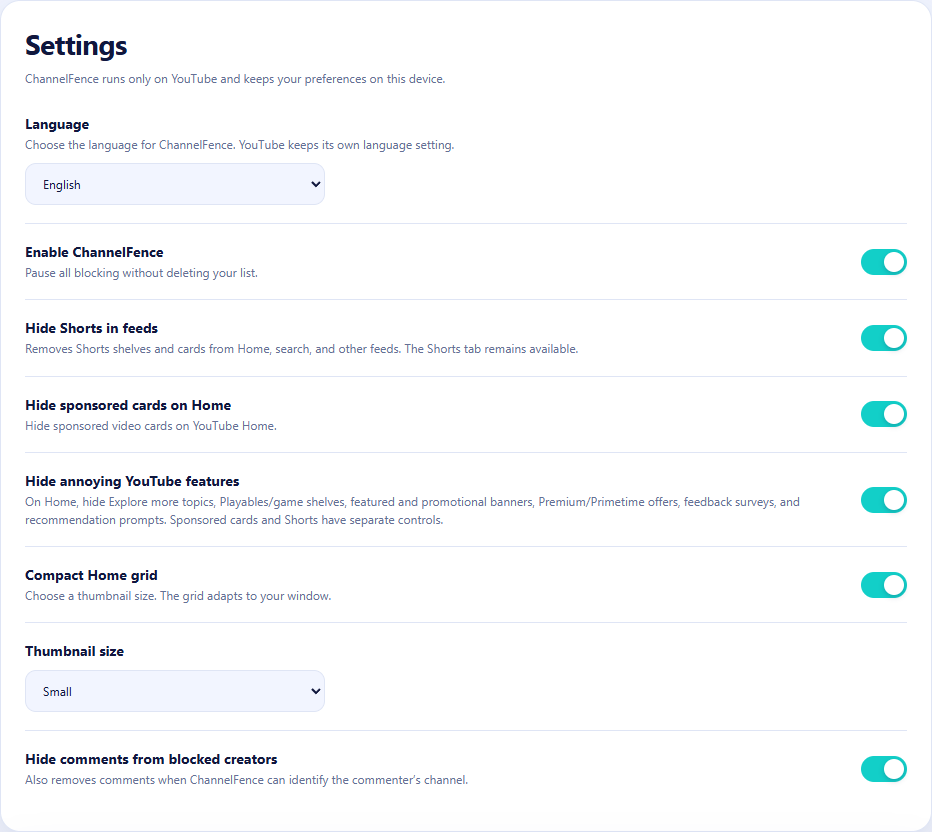
If the rest of Home feels crowded, optional cleanup controls hide supported sponsored cards, Explore more topics, game shelves, and promotional inserts. The compact grid offers Small, Medium, and Large thumbnails. These controls start off, and do not skip ads playing inside videos or the Shorts viewer.
YouTube changes. We test for that.
ChannelFence's public live YouTube checks are scheduled twice a day for Chrome and daily for Firefox, alongside regression tests for updates. Live checks cover selected creator controls across all 18 supported interface languages. The changelog records fixes and the coverage added with them.
Our aim is to catch compatibility problems early and patch them before you notice. A failure in a covered workflow can flag a YouTube change without waiting for a user report. Tests cannot catch every layout or account experiment, and releasing a fix still takes time. Public results let you inspect that maintenance work yourself.
When Channel Blocker may fit better
If you specifically want to write matching patterns, Channel Blocker's documented regex support is a reason to consider it. ChannelFence does not provide a regex or keyword-rule editor. Open source and a no-data-collection declaration are strengths shared by both projects, rather than reasons to dismiss either one.
ChannelFence's own privacy policy explains an important detail: it may look up public compact Shorts creator metadata directly from YouTube, without account credentials. Your list and settings stay in local extension storage and are not sent to the developer.
Block the creator. Keep the rest of your feed.
ChannelFence is free and open source, with no account required.